


Access Availity Certified
Access the Availity Certified portal through Availity Essentials.
Note: Your Availity user account must have an email address that is dedicated and unique
to you (i.e., not an email address shared with others) before you access the store and
purchase a program. If necessary, go to My Account in Availity Essentials and change your email address to one that is unique to you before proceeding to the next
step.
The Availity Certified portal is an online learning platform that enables users to browse, purchase, and complete training courses.
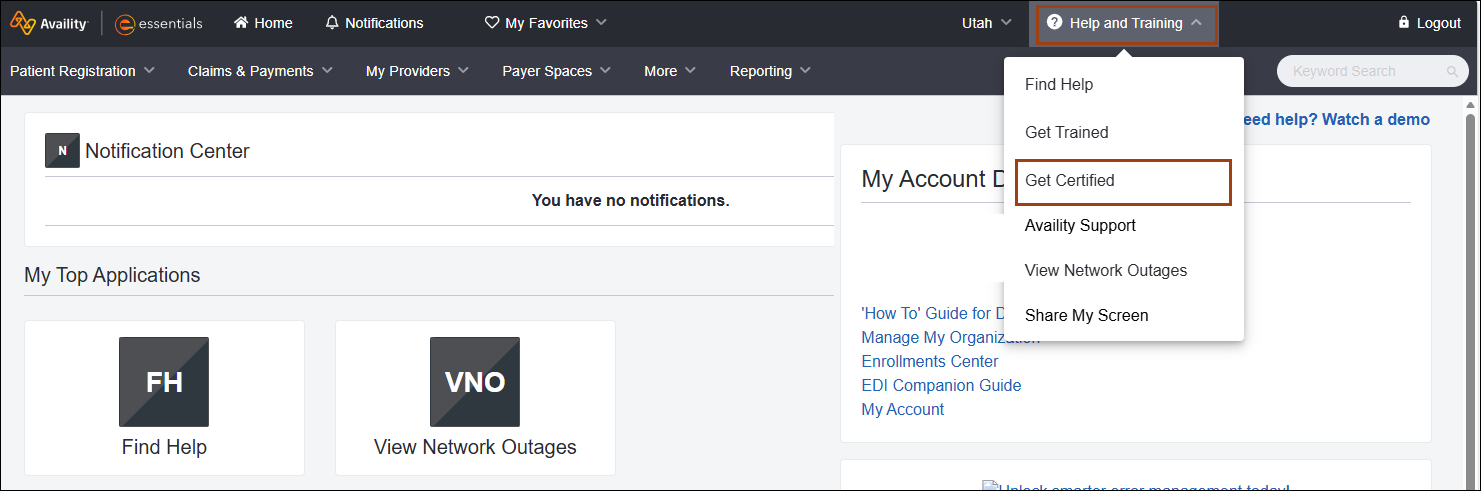
Perform the following steps to access the Availity Certified portal.
- Log in to Availity Essentials.
- In the upper-right corner of the Essentials navigation bar, select Help and Training.
-
Select Get Certified.
The Availity Certified store opens in a new tab in your browser.
Remember: Ensure that your browser’s pop-up and redirect blocker
settings are disabled. When enabled, these features prevent the Availity Certified portal from opening. For more information about updating your browser
settings, review About
pop-up and redirect blockers.