Acknowledgements and/or reports
Availity's batch EDI processing generates response files (acknowledgements and reports) for each submitted batch file. Availity provides standard response files recommended in the official HIPAA implementation guides (called TR3s) and proprietary reports for end-to-end tracking and accountability of each submitted transaction.
The following types of response files are available:
- Notification file
-
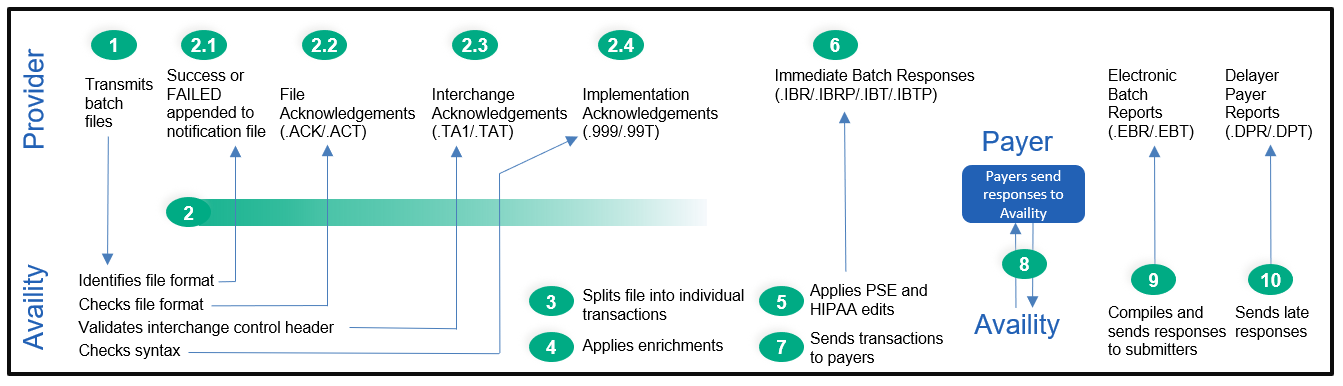
Indicates whether a batch file was successfully received by Availity and recognized as a batch file.
- File acknowledgement (ACK)
-
Indicates that a batch file failed Availity proprietary validation, and usually means that the format of the batch file (which is expected to be X12) is invalid.
- Interchange acknowledgement (TA1)
-
Indicates that the interchange control header (ISA), interchange control trailer (IEA), or functional group header (GS) segments of a batch file are invalid.
- Implementation acknowledgement (999)
-
Reports the acceptance or rejection of each transaction set (ST/SE) in a batch file, and the transactions they contain, based on whether any X12 syntax errors were detected.
- Immediate batch response (IBR)
-
Acknowledges claims accepted by Availity and identifies claims that were rejected due to HIPAA edits, payer-specific edits (for example, duplicate transactions, member ID formatting issues), or clinical edits (for example, billing or coding issues) conducted by Availity on behalf of payers. These response files are typically available within minutes after submitting a batch file, but can take up to 24 hours depending upon the volume of claims processing at that time.
- Immediate batch response plus (IBRP)
-
Acknowledges claims accepted by Availity and identifies warning messages and claims that were rejected due to HIPAA edits, payer-specific edits (for example, duplicate transactions, member ID formatting issues), or clinical edits (e.g, billing or coding issues) conducted by Availity on behalf of payers. These response files are typically available within minutes after submitting a batch file, but can take up to 24 hours depending upon the volume of claims processing at that time.
- Electronic batch report (EBR)
-
Contains aggregated initial responses from payers and trading partners (such as other clearinghouses) about the status of submitted claims. The report is typically available 24-48 hours after claims accepted by Availity are submitted to a payer.
- Delayed payer report (DPR)
-
Contains aggregated claim status information from payers that utilize batch processing or other non-real-time adjudication processes, or in cases where a payer response is received after Availity has already sent an EBR to your organization. The report is typically available within 30 days after claims accepted by Availity are submitted to a payer. This report is not available for all payers.
- Payer responses for non-claim transactions
-
Response files for non-claim transactions include the following: eligibility & benefits responses (.271), claim status responses (.277), authorization/referral (.278), health care services review notification and acknowledgement (.278N), and health care services review (.278ebr) summary text report.
All response files, except notification files, are available from the ReceiveFiles folder for an organization. The administrator for an organization can set up reporting preferences that specify which response files are generated, the delivery schedule, and grouping options. Notification files are available from the SendFiles folder for an organization.
The following figure shows the response files that can be generated as an EDI file is processed by Availity.